
To remove your personal information from the properties of a file you should first open the relevant document.
Click File and then Info, which should then bring up the following options:
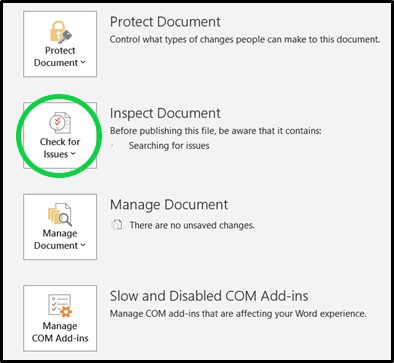
Next, click the Check for Issues dropdown, and then select Inspect Document.
You will probably get a warning message next telling you to save a copy, and then the following box should appear:
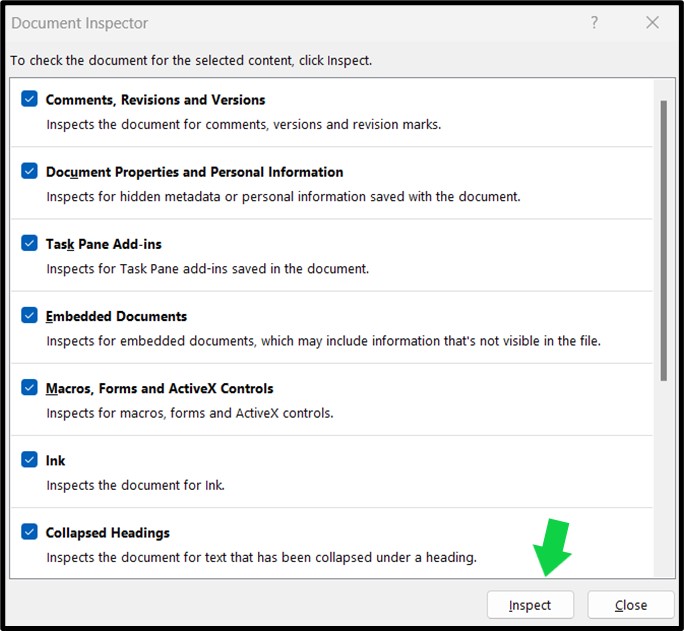
Check that all of the relevant boxes are ticked, and then click the Inspect button at the bottom.
Once the inspection is complete you may have some action to take in order to remove personal information. For example, the document I drafted this blog post in had the following information contained:

Once I clicked Remove All, the box updated and now when I look at the file info it states the following:
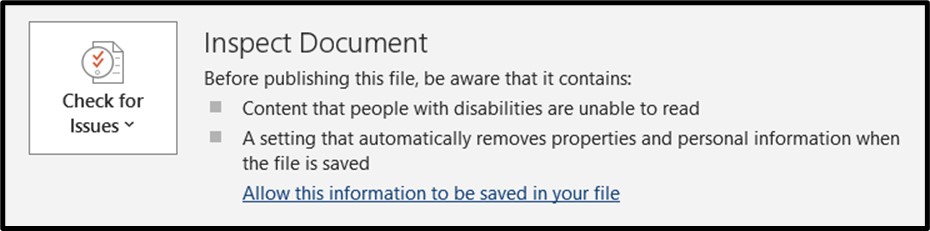
Once this setting has changed, the document should display a notification message stating PERSONAL INFORMATION REMOVAL ENABLED when you next open it.
Just to be clear, this process removes personal data from the file properties, but if you have written personally identifying information within the actual text of your document, you will need to remove this manually.
There are pros and cons for leaving personal data in the document properties, such as document author details, and I am not implying that you should remove them. But, depending on what the document is for and where it is being sent, you may wish to remove such details, and hopefully now you can.
Thanks for reading, and have a great day!
Are you an author looking for an editor?
Check out my about and services pages to see if we might be a good fit.
If you have any questions, or would like a quotation for your manuscript, feel free to get in touch.
 V.A. Editing